
How to Tell If Your F-150 Has Adaptive Cruise Control: 5 Quick Ways
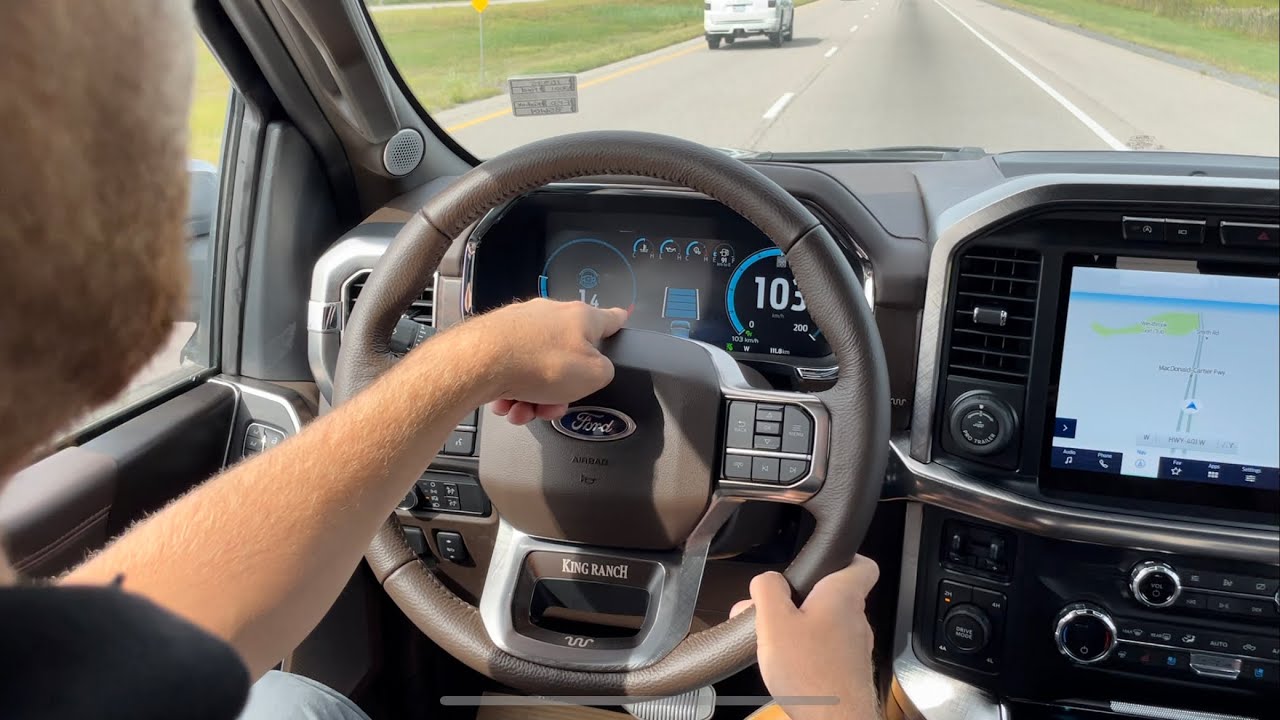
- how to tell if your f150 has adaptive cruise control: quick signs to look for
- Check your steering wheel, dash and infotainment menus for adaptive cruise buttons and icons
- Look for front bumper or grille sensors (radar/camera) that indicate adaptive cruise hardware
- Confirm via VIN, window sticker (Monroney) or FordPass/owner’s manual to verify the option
- Which F-150 model years, trims and option packages typically include adaptive cruise control
how to tell if your f150 has adaptive cruise control: quick signs to look for
Check the steering wheel and instrument cluster first. Many Ford F-150s with adaptive cruise control (ACC) have an extra button on the steering wheel — often a small car icon with distance bars or a button labeled to change following distance. When ACC is available and active, the instrument cluster will usually display a speed with a small vehicle icon and one or more bars or lines indicating the selected following gap; some models also show “Adaptive Cruise” or “ACC” text in the display.
Look for front-facing sensors and camera hardware. A visible radar module or sensor housing is commonly mounted in the center of the grille or lower bumper, and a forward-facing camera is often located behind the windshield near the rear-view mirror. Trucks equipped with Ford’s Co-Pilot360 or driver-assist packages are more likely to include ACC — those package names or badges on window stickers and option lists are a clear sign the feature may be fitted.
Verify via documentation or a simple in-vehicle check. The owner’s manual and the Monroney window sticker (build sheet/options list) will list adaptive cruise control if it’s factory-installed. You can also engage standard cruise control: if a separate distance-setting button appears in the cluster or on the steering wheel and the truck automatically adjusts speed to match slower traffic ahead, that confirms ACC is present and functioning.
Start at the steering wheel when looking for adaptive cruise control. Many cars place the main controls on the left or right spoke—look for buttons labeled SET, RES or ACC, a speedometer or car icon, and sometimes a distance/gap button to adjust following space. These tactile controls are the quickest indicator that your vehicle has adaptive cruise features and usually allow you to engage, resume, and change the set speed without navigating menus.
Check the instrument cluster and dash for accompanying icons and readouts. Common symbols include a small car with radar/wave lines, a speedometer with signal waves, or a numeric set-speed readout plus gap bars that show the selected following distance. In many models the icon changes color or illuminates when adaptive cruise is active and the display will show the current set speed and gap setting — useful visual confirmation while driving.
Finally, browse the infotainment menus under Settings or Driver Assistance/Vehicle Settings to find and enable adaptive cruise options. Menu entries are often titled "Adaptive Cruise," "ACC," or "Cruise Control" and let you toggle the system, adjust default following distance, and set speed limiter behaviors. If the steering wheel and dash suggest the feature exists but it’s not active, the infotainment driver assistance menu is the place to enable and customize it.
Quick checklist
- Look for cruise icons or ACC text on the steering wheel buttons.
- Scan the dash for a car-with-waves icon, set-speed readout, or gap bars.
- Open infotainment Settings > Driver Assistance or Vehicle Settings to enable and configure.
- If unsure, check the owner’s manual for model-specific names and locations.
Look for front bumper or grille sensors (radar/camera) that indicate adaptive cruise hardware
Front-end hardware for adaptive cruise control is often visible if you know where to look. Check the center of the grille and the lower area of the front bumper for small, deliberate modules—these are typically the locations automakers place a radar sensor or a low-profile camera. SEO-friendly terms to watch for when scanning images or listings include “ACC,” “radar,” “front sensor,” and “camera module,” since sellers sometimes reference these when highlighting driver-assistance features.
Visually, radar units commonly appear as a flat, puck-like or rectangular module set behind a protective plastic cover or behind the emblem, often painted to match the grille. Cameras tend to show a small lens or glass window and may be integrated near the grille’s top edge or tucked into a black housing in the bumper. These components are usually distinct from parking sonar (small round dots) because they are larger and often centered for optimal forward sensing.
Look for signs that the piece is an active sensor rather than trim: a clear lens, a glossy or matte black housing, or visible wiring and mounting brackets behind a grille opening. OEM adaptive cruise sensors may also have subtle manufacturer markings or part numbers on their housings; aftermarket radar retrofit kits can look different, so consistent styling and a factory-fitted appearance are good indicators of original equipment adaptive cruise hardware.
A close photo inspection can reveal whether the vehicle has the right hardware to support ACC—spotting a centered sensor, emblemed grille placement, or a flush-mounted camera lens are practical visual cues. If images are unclear, request a close-up of the grille and bumper center area to verify the presence and condition of the radar/camera components.
Confirm via VIN, window sticker (Monroney) or FordPass/owner’s manual to verify the option
Confirming a vehicle option with primary sources is essential to avoid surprises—use the VIN, the factory window sticker (Monroney), and your FordPass account or owner’s manual as authoritative references. The VIN is the single identifier that ties a vehicle to its factory build, the Monroney sticker documents how the vehicle was originally equipped and optioned for sale, and FordPass or the vehicle’s owner’s documentation often provides a digital record or owner-focused description of installed features. Relying on these sources together gives the clearest picture of whether a specific option was factory-installed or aftermarket.
How to verify using each source
- VIN: Locate the VIN on the dashboard, driver door jamb, vehicle registration, or title and run it through a reputable VIN decoder or request a factory build sheet from the dealer. The VIN ties directly to option codes and production records used to confirm installed equipment.
- Window sticker (Monroney): Review the Monroney for the list of standard equipment, optional packages, and option codes/prices. The sticker reflects the factory configuration at the time of sale and is one of the clearest documents for confirming factory-installed options.
- FordPass / owner’s manual: Check your FordPass vehicle profile or the digital owner’s materials for a summary of features and sometimes a link to the original window sticker or build data. If digital records are incomplete, contact a Ford dealer or customer service with the VIN to request an official build document.
When verifying an option, compare names and option codes across the VIN report, Monroney, and FordPass/owner’s manual to ensure consistency; differences can indicate dealer-installed accessories or later modifications rather than factory options. If documentation is missing or ambiguous, a dealer-supplied build sheet based on the VIN is the most reliable way to confirm factory options—keep copies or screenshots of the Monroney and digital records for reference during sale, service, or warranty interactions.
Which F-150 model years, trims and option packages typically include adaptive cruise control
Which F-150 model years, trims and option packages typically include adaptive cruise control
Adaptive cruise control began appearing on the F-150 lineup in the mid-2010s and has become increasingly common on models from roughly 2016 onward. Early availability was limited to option packages on higher-spec trucks, and by the late 2010s and early 2020s ACC was widely offered across more trims as part of Ford’s expanding suite of driver-assist features. Because Ford has changed package names and feature bundling over different model years, buyers should check the specific model-year options list or window sticker to confirm presence of ACC.
Adaptive cruise control is most commonly found on mid- and upper-level trims rather than base work-truck versions. Typical trims that often include ACC either as standard or as an available option are: Lariat, King Ranch, Platinum, Limited, and many Raptor configurations; entry-level XL and some XLT trucks usually require an option package to add the feature. Dealers and owners frequently report ACC being bundled with comfort and technology upgrades, so trimmed-up XLTs can also carry it when equipped appropriately.
On many model years ACC is bundled into named technology or driver-assist packages rather than sold as a stand‑alone option. Look for packages labeled with terms like Technology Package, Driver Assistance, or Ford’s branded suites such as Co‑Pilot360 / Co‑Pilot360 Assist, which commonly include adaptive cruise control alongside lane‑keeping, forward‑collision warning, and automated braking. Availability and exact package contents vary by year and market, so the specific package name will differ but the pattern—ACC included within a broader driver‑assistance or technology bundle—remains consistent.
If you’re shopping used, common indicators that an F-150 has adaptive cruise control include factory-installed driver-assist packages listed on the Monroney sticker or dealer window sticker and presence of sensors or radar housing in the front grille area. Certified pre-owned listings and build sheets will often call out “adaptive cruise” or “adaptive cruise control with stop-and-go” when present, but model-year packaging differences mean the safest verification is the original build/spec sheet or a VIN-based options decode.
Did you like this content How to Tell If Your F-150 Has Adaptive Cruise Control: 5 Quick Ways See more here General Mechanics.

Leave a Reply