
How to Change Acura MDX Key Battery: Step-by-Step Guide
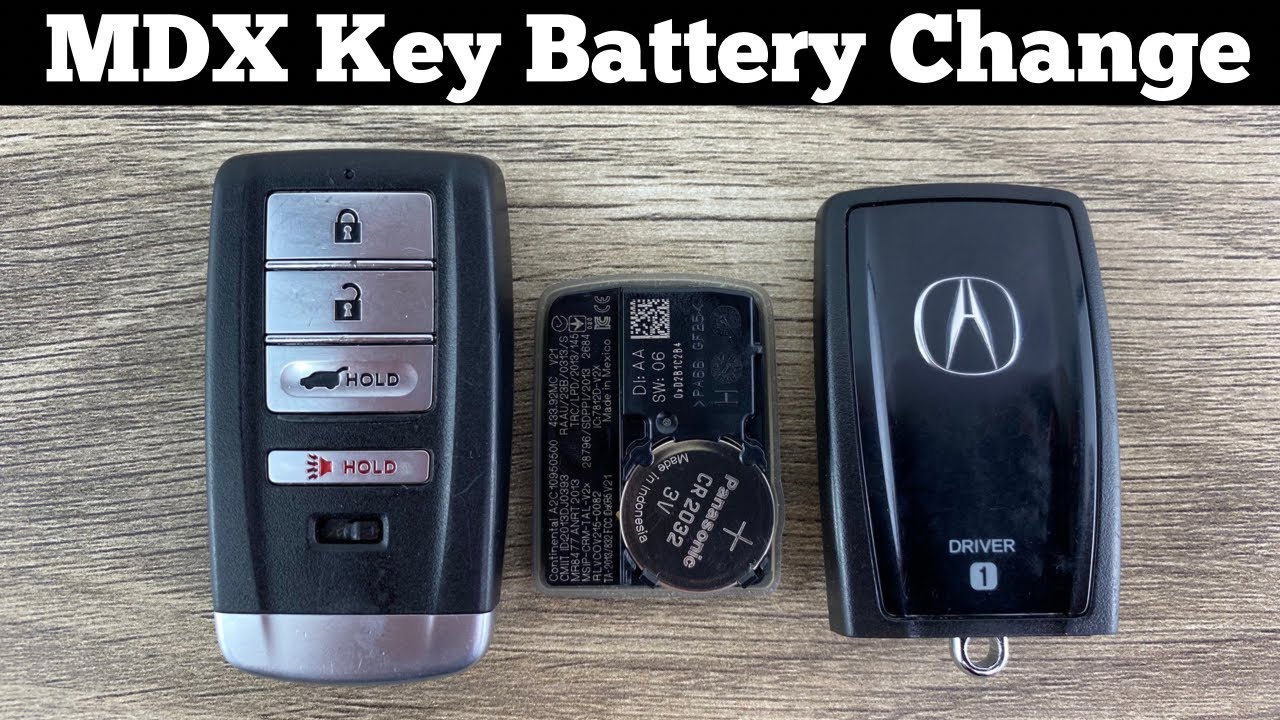
Step-by-Step Guide on How to Change Acura MDX Key Battery
Changing the battery in your Acura MDX key fob is a straightforward process that can save you time and money. By following this step-by-step guide, you can ensure that your key fob functions properly and avoids any unexpected lockouts.
What Youll Need
Before you begin, gather the necessary tools and materials:
- New battery: Typically a CR2032 battery, but check your owners manual for specifics.
- Screwdriver: A small flathead screwdriver or a coin may be needed to open the key fob.
- Work surface: A clean, flat area to avoid losing small parts.
Step-by-Step Instructions
1. Open the Key Fob: Locate the small notch on the side of the key fob. Use the flathead screwdriver or a coin to gently pry open the key fob. Be careful not to apply too much pressure to avoid damaging the casing.
2. Remove the Old Battery: Once the fob is open, you will see the battery compartment. Take note of the batterys orientation before removing it. Use your fingers or a small tool to carefully pop out the old battery.
3. Insert the New Battery: Place the new CR2032 battery into the compartment, ensuring it is positioned in the same orientation as the old battery. The positive side (usually marked with a "+" sign) should be facing up.
4. Reassemble the Key Fob: Align the two halves of the key fob and press them together until you hear a click, indicating that it is securely closed. Make sure there are no gaps between the two halves.
By following these steps, you can easily change the battery in your Acura MDX key fob, ensuring that you have reliable access to your vehicle. Regularly checking the batterys status can help prevent future inconveniences.
Tools You Need to Replace Your Acura MDX Key Battery
Replacing the battery in your Acura MDX key fob is a straightforward process that requires just a few essential tools. Having the right equipment on hand can make the task quicker and more efficient, ensuring that your key fob functions properly without any hassle. Here’s a list of the tools you will need:
- Small Flathead Screwdriver: This is essential for prying open the key fob casing without causing damage.
- Replacement Battery: Ensure you have the correct battery type, typically a CR2032 or CR2025 for most Acura MDX models.
- Tweezers: These can help you handle the small battery more easily, especially when inserting it into the fob.
- Microfiber Cloth: Useful for cleaning the key fob and ensuring that there is no dirt or debris when you replace the battery.
Before you start, its advisable to work in a well-lit area to avoid losing any small components. A small flathead screwdriver will be your primary tool for opening the key fob. Insert it gently into the seam of the fob and twist to create a gap. This will allow you to carefully separate the two halves of the fob without breaking the plastic casing.
Once you have the fob open, use tweezers to remove the old battery, ensuring you note the orientation of the battery for correct installation of the new one. Replace it with the new battery, ensuring it is seated properly. After the battery is in place, clean any dirt from the fob with a microfiber cloth before snapping the casing back together. Having these tools ready will streamline the battery replacement process for your Acura MDX key fob.
Common Signs That Your Acura MDX Key Battery Needs Changing
Recognizing when the battery in your Acura MDX key fob needs to be replaced is crucial for maintaining seamless access to your vehicle. If youre experiencing any issues with your key fob, it may be time to check the battery. Here are some common signs that indicate a battery replacement might be necessary.
1. Weak or Inconsistent Signal
One of the first signs that your key fob battery is running low is a weak or inconsistent signal. If you find yourself having to press the key fob button multiple times or standing closer to your vehicle than usual for it to work, it’s likely that the battery is nearing the end of its life. This inconsistency can become increasingly frustrating and may indicate that the battery is failing.
2. Reduced Range
Another common symptom of a dying key fob battery is a reduced operational range. If your key fob used to unlock your Acura MDX from a distance, but now requires you to be right next to the vehicle, this is a clear indicator that the battery needs changing. A healthy battery should provide adequate range for your keyless entry system.
3. Warning Light on Dashboard
In some cases, your Acura MDX may alert you to a key fob battery issue through a warning light on the dashboard. This visual cue is designed to notify you that the key fob battery is low and should be replaced soon. If you see this warning light, it’s wise to take action promptly to avoid being locked out of your vehicle.
If you notice that certain buttons on your key fob are unresponsive, this can also signify a battery issue. Whether its the lock, unlock, or trunk release button, a lack of response may mean that the battery is too weak to power the key fob effectively. In such cases, replacing the battery is the most straightforward solution to restore functionality.
Keeping an eye out for these signs can help you avoid inconvenient situations and ensure your Acura MDX key fob operates smoothly.
Tips for Extending the Life of Your Acura MDX Key Battery
To ensure that your Acura MDX key battery lasts as long as possible, it’s essential to adopt some simple yet effective practices. The battery in your key fob is vital for its functionality, so taking care of it can save you from unexpected replacements. Here are some tips to extend the life of your Acura MDX key battery:
1. Limit Key Fob Usage
While it’s convenient to use your key fob frequently, try to minimize its use whenever possible. Instead of using the remote start feature or unlocking the doors from a distance, consider using the traditional key method when feasible. Reducing the frequency of button presses can significantly prolong the batterys lifespan.
2. Store Your Key Fob Properly
The way you store your key fob can impact its battery life. Keep your Acura MDX key fob in a cool, dry place away from extreme temperatures and moisture. Exposure to heat or cold can degrade the battery faster. Additionally, avoid placing your key fob near electronic devices that may cause interference, such as smartphones or tablets.
3. Check for Battery Drain
Regularly check your key fob for signs of battery drain. If you notice that the range of your key fob has decreased or if the buttons are becoming unresponsive, it may be time to replace the battery. By monitoring its performance, you can prevent being locked out of your vehicle due to a dead battery.
4. Replace the Battery Promptly
When it’s time to replace the battery, choose high-quality replacements that are compatible with your Acura MDX. Always follow the manufacturers guidelines for battery replacement, and ensure that the new battery is properly installed to avoid any issues. Using the correct battery type will help maintain optimal performance and longevity.
By implementing these simple tips, you can extend the life of your Acura MDX key battery, ensuring reliable access to your vehicle for years to come.
Frequently Asked Questions About Acura MDX Key Battery Replacement
What type of battery does the Acura MDX key fob use?
The Acura MDX key fob typically uses a CR2032 lithium coin battery. This battery is widely available at most electronics stores, supermarkets, and online retailers. Its essential to ensure you purchase a high-quality battery to guarantee optimal performance and longevity.
How do I know when its time to replace the key fob battery?
There are several signs that indicate your Acura MDX key fob battery may need replacement. Look out for the following symptoms:
- Weak Signal: Difficulty locking or unlocking your vehicle from a distance.
- Intermittent Functionality: The key fob works inconsistently.
- Warning Light: Dashboard alerts indicating a low key fob battery.
If you experience any of these issues, it may be time to replace the battery.
How do I replace the battery in my Acura MDX key fob?
Replacing the battery in your Acura MDX key fob is a straightforward process. Follow these steps for a successful replacement:
- Open the Key Fob: Use a small flathead screwdriver to gently pry apart the key fob casing.
- Remove the Old Battery: Take out the old CR2032 battery, noting the orientation of the positive and negative sides.
- Insert the New Battery: Place the new CR2032 battery in the same orientation as the old one.
- Reassemble the Key Fob: Snap the two halves of the fob back together until you hear a click.
After replacing the battery, test the key fob to ensure it is functioning correctly.
Can I replace the key fob battery myself, or should I go to a dealer?
While it is entirely possible to replace the key fob battery yourself, many Acura MDX owners choose to visit a dealership for convenience or if they encounter difficulties. If youre comfortable with DIY tasks, following the steps outlined above will save you time and money. However, if you prefer professional assistance or have a key fob with advanced features, consulting your local Acura dealer is a good option.
Did you like this content How to Change Acura MDX Key Battery: Step-by-Step Guide See more here General Mechanics.

Leave a Reply